Teknik Belgeler
Özellikler
Marka
StarTech.comVideo Bağlantısı Tipi
Display Port
Ürün Tipi
KVM (Keyboard/Video Monitor/Mouse) Switch
Bağlantı Noktalarının Sayısı
4
Desteklenen Ekran Sayısı
1
Video Çıkışı Sayısı
1
Maksimum Çözünürlük
2560 x 1600 pixel
Klavye/Fare Bağlantı Tipi
USB
Ses Bağlantı Tipi
3,5 mm Stereo
Standartlar/Onaylar
RoHS, TAA, FC, CE
Genişlik
220.7mm
Derinlik
130.6mm
Yükseklik
44mm
Menşe
Taiwan, Province Of China
Ürün Ayrıntıları
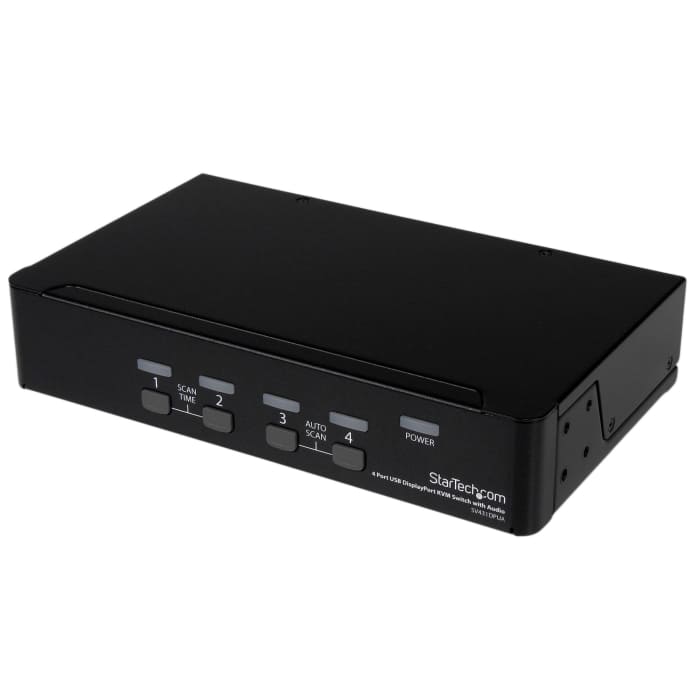
The SV431DPUA 4 Port USB DisplayPort KVM Switch with Audio combines next generation display standards with seamless KVM control of up to 4 connected PC or Mac computers.
Featuring DisplayPort resolutions of 2560x1600 @60Hz, as well as offering both 7.1 HD digital audio (with supporting displays and sources) and separate 3.5mm stereo audio support. An integrated USB 2.0 hub allows you to share 2 additional peripherals among attached computers as if they were directly connected.
Suitable for high quality static imaging applications such as health care (MRI, X-ray diagnostics, etc.), a maximum resolution of 3840x2400 is supported at reduced refresh rates.
A simple yet comprehensive solution, the 4-port KVM features both front-panel push-button and hotkey switching, and offers a small form factor with rear connection ports, to minimize workspace disruptions.
This product is TAA compliant and backed by a Startech.com 3-year warranty with free lifetime technical support.
Rackmount your KVM switch
If youd like to mount this KVM switch to your server rack, StarTech.com offers a 1U Rackmount Bracket (sold separately) that turns this KVM into a rackmountable KVM.
Can I use any mouse or keyboard with the KVM Switch?
It will depend on the type of mouse or keyboard used. It is advised by the manufacturers to use standard wired 104 key keyboards and a standard wired mouse that does not have additional features. This includes wireless, gaming and Apple keyboards.
Stok bilgileri geçici olarak kullanılamıyor.
Teklif İsteyiniz
1
Teklif İsteyiniz
Stok bilgileri geçici olarak kullanılamıyor.
1
Teknik Belgeler
Özellikler
Marka
StarTech.comVideo Bağlantısı Tipi
Display Port
Ürün Tipi
KVM (Keyboard/Video Monitor/Mouse) Switch
Bağlantı Noktalarının Sayısı
4
Desteklenen Ekran Sayısı
1
Video Çıkışı Sayısı
1
Maksimum Çözünürlük
2560 x 1600 pixel
Klavye/Fare Bağlantı Tipi
USB
Ses Bağlantı Tipi
3,5 mm Stereo
Standartlar/Onaylar
RoHS, TAA, FC, CE
Genişlik
220.7mm
Derinlik
130.6mm
Yükseklik
44mm
Menşe
Taiwan, Province Of China
Ürün Ayrıntıları
The SV431DPUA 4 Port USB DisplayPort KVM Switch with Audio combines next generation display standards with seamless KVM control of up to 4 connected PC or Mac computers.
Featuring DisplayPort resolutions of 2560x1600 @60Hz, as well as offering both 7.1 HD digital audio (with supporting displays and sources) and separate 3.5mm stereo audio support. An integrated USB 2.0 hub allows you to share 2 additional peripherals among attached computers as if they were directly connected.
Suitable for high quality static imaging applications such as health care (MRI, X-ray diagnostics, etc.), a maximum resolution of 3840x2400 is supported at reduced refresh rates.
A simple yet comprehensive solution, the 4-port KVM features both front-panel push-button and hotkey switching, and offers a small form factor with rear connection ports, to minimize workspace disruptions.
This product is TAA compliant and backed by a Startech.com 3-year warranty with free lifetime technical support.
Rackmount your KVM switch
If youd like to mount this KVM switch to your server rack, StarTech.com offers a 1U Rackmount Bracket (sold separately) that turns this KVM into a rackmountable KVM.
Can I use any mouse or keyboard with the KVM Switch?
It will depend on the type of mouse or keyboard used. It is advised by the manufacturers to use standard wired 104 key keyboards and a standard wired mouse that does not have additional features. This includes wireless, gaming and Apple keyboards.